

Accept cryptocurrency payments on your Magento store
Requirements
Magento >= 2.4
Magento >= 2.3.5
Description
Accept payments in Bitcoin, Bitcoin Cash, Litecoin, Ethereum, USDT and Matic directly to your crypto wallet, without any sign-ups or lengthy processes. All you need is to provide your crypto address.
Allow users to pay with crypto directly on your store
The CryptAPI extension enables your Magento store to receive payments in cryptocurrency, with a simple setup and no sign-ups required.
Accepted cryptocurrencies & tokens include:
- (BTC) Bitcoin
- (ETH) Ethereum
- (BCH) Bitcoin Cash
- (LTC) Litecoin
- (MATIC) Polygon
- (TRX) Tron
- (BNB) Binance Coin
- (USDT) USDT
CryptAPI supports 100+ cryptocurrencies and tokens. View the complete list here.
CryptAPI plugin will attempt to automatically convert the value you set on your store to the cryptocurrency your customer chose. Exchange rates are fetched every 5 minutes.
Supported currencies for automatic exchange rates are:
- (USD) US Dollar
- (EUR) Euro
- (GBP) GB Pound
- (CAD) Canadian Dollar
- (CHF) Swiss Franc
- (JPY) Japanese Yen
- (AED) UAE Dollar
- (DKK) Danish Krone
- (BRL) Brazilian Real
- (CNY) Chinese Yuan
- (HKD) Hong Kong Dollar
- (INR) Indian Rupee
- (MXN) Mexican Peso
- (UGX) Uganda Shillings
- (PLN) Poland Zloti
- (PHP) Philippine Peso
- (CZK) Czech Koruna
- (HUF) Hungarian Forint
- (BGN) Bulgarian Lev
- (RON) Romanian Leu
- (ZAR) South African Rand
- (LKR) Sri Lankan Rupee
- (TRY) Turkish Lira
- (THB) Thai Baht
- (RUB) Russian Ruble
- (IDR) Indonesian Rupiah
- (MYR) Malaysian Ringgit
- (SGD) Singapore Dollar
- (TWD) New Taiwan Dollar
- (AUD) Australian Dollar
- (NGN) Nigerian Naira
- (SEK) Swedish Krona
- (NOK) Norwegian Krone
- (UAH) Ukrainian Hryvnia
- (VND) Vietnamese Dong
If your Magento's currency is none of the above, the exchange rates will default to USD. If you're using Magento in a different currency not listed here and need support, please contact us via our live chat.
Why choose CryptAPI?
CryptAPI has no setup fees, no monthly fees, no hidden costs, and you don't even need to sign-up! Simply set your crypto addresses and you're ready to go. As soon as your customers pay we forward your earnings directly to your own wallet.
CryptAPI has a low 1% fee on the transactions processed. No hidden costs.
For more info on our fees click here.
Installation
- Upload code to the folder app/code/Cryptapi/Cryptapi
- Enter following commands to install module:
php bin/magento module:enable Cryptapi_Cryptapi
php bin/magento setup:upgrade
php bin/magento setup:di:compile
php bin/magento cache:enable cryptapi_cryptocurrencies- Enable and configure CryptAPI in Magento Admin under Stores -> Configuration -> Sales -> Payment Methods -> CryptAPI
Configuration
- Access your Magento Admin Panel
- Go to Stores -> Configuration -> Sales -> Payment Methods -> CryptAPI
- Activate the payment method (if inactive)
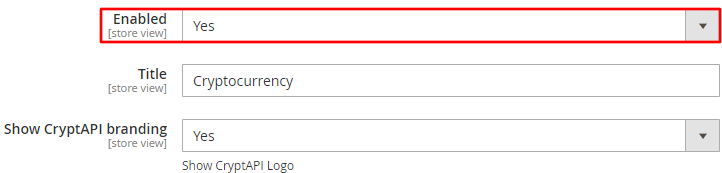
- Set the name you wish to show your users on Checkout (for example: "Cryptocurrency")
- Select which cryptocurrencies you wish to accept (control + click to select many)
- Input your addresses to the cryptocurrencies you selected. This is where your funds will be sent to, so make sure the addresses are correct.
- Click "Save Changes"
- All done!
Tutorial
Installing CryptAPI Extension in Magento
Follow these step-by-step instructions to install and configure the CryptAPI cryptocurrency payment extension in your Magento store.
Step 1: Access Magento Administration
After completing the installation, go to the Magento Administration area and click Stores.
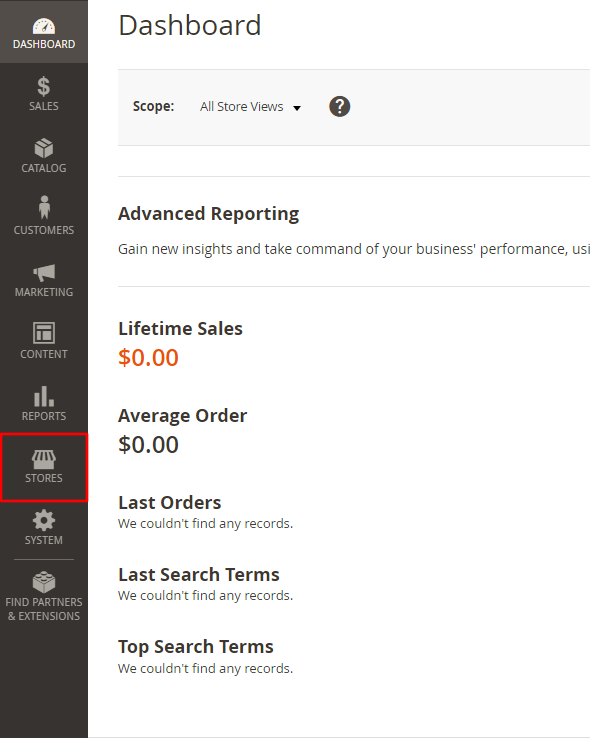
Step 2: Navigate to Configuration
In the menu, click Configuration.
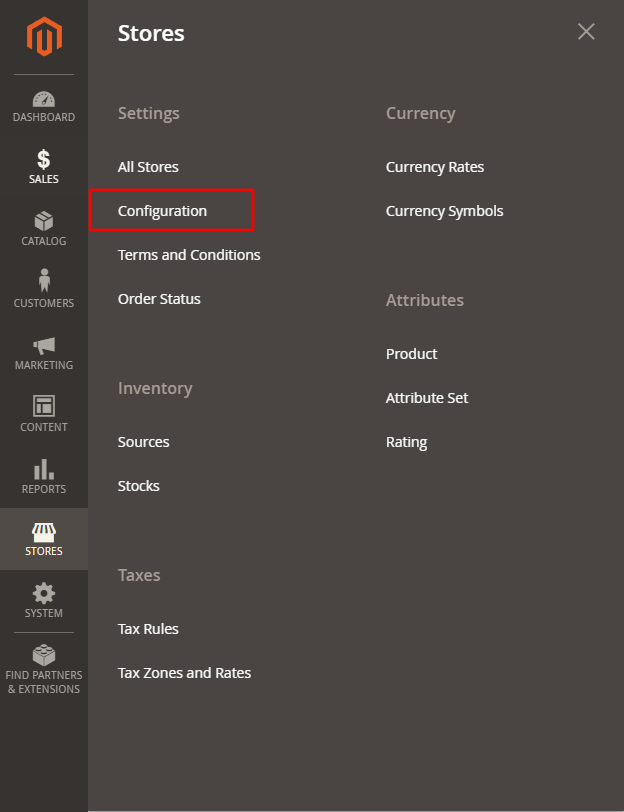
Step 3: Access Sales Configuration
Click SALES to show the dropdown menu.
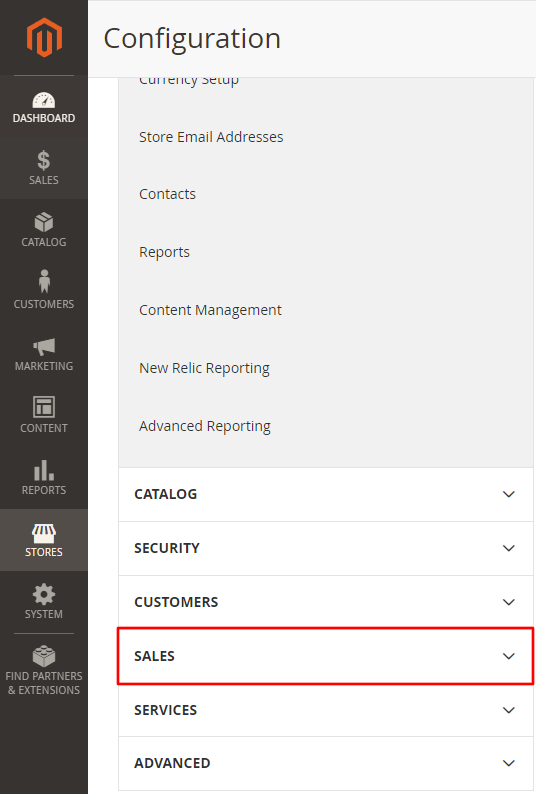
Step 4: Open Payment Methods
Then, click Payment Methods.
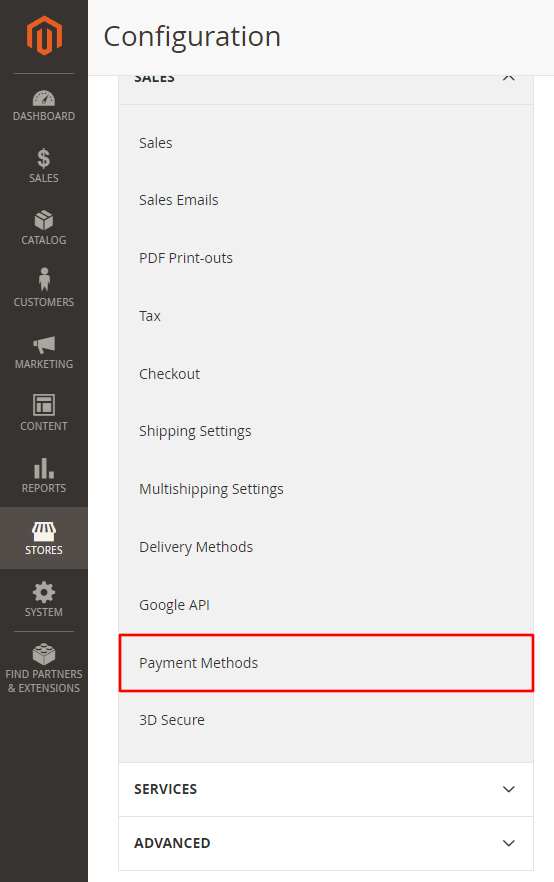
Step 5: Locate CryptAPI Settings
In the Payment Methods page, scroll to the CryptAPI area, where you will set up our extension.
Step 6: Enable the Extension
It's important to enable the extension by setting the Enable option to "Yes". Feel free to set up the remaining settings as you wish.
Step 7: Select the Cryptocurrencies
Select the cryptocurrencies you want to accept (CTRL + click on Windows and CMD + Click on MacOS, to accept multiple currencies).

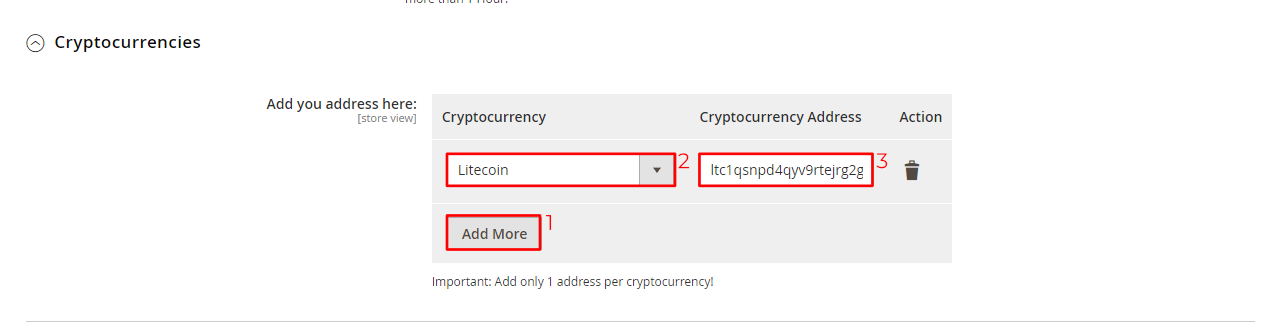
In the dropdown, add the addresses of the cryptocurrencies you want to accept.
- Click Add More to add a row.
- Select the cryptocurrency you wan't to add in the list.
- Paste your wallet address.
Notice: You can only add one address per cryptocurrency.
Step 8: Save Configuration
Finally, Save the settings and your Magento Store is now ready to accept cryptocurrencies.
Frequently Asked Questions
Do I need an API key?
No. You just need to insert your crypto address of the cryptocurrencies you wish to accept. Whenever a customer pays, the money will be automatically and instantly forwarded to your address.
How long do payments take before they're confirmed?
This depends on the cryptocurrency you're using. Bitcoin usually takes up to 11 minutes, Ethereum usually takes less than a minute.
Is there a minimum for a payment?
Yes, the minimums change according to the chosen cryptocurrency and can be checked here. If the Magento order total is below the chosen cryptocurrency's minimum, an error is raised to the user.
Where can I get support? The easiest and fastest way is via our live chat on our website or via our contact form.
Changelog
1.0
- Initial release.
2.0
- New coins.
- Updated codebase.
- New API URL.
- UI Improvements
- Minor Bug Fixes
3.0
- New settings and color schemes to fit dark mode
- New settings to add CryptAPI's services fees to the checkout
- New settings to add blockchain fees to the checkout
- Upgrade the settings
- Added a history of transactions to the order payment page
- Better handling of partial payments
- Disable QR Code with value in certain currencies due to some wallets not supporting it
- Minor fixes
- UI Improvements
3.0.1
- Minor fixes
3.0.2
- Minor fixes
3.0.3
- Minor fixes
3.1
- Support CryptAPI Pro
- Minor fixes
3.1.1
- Minor fixes
3.2.0
- Support for BlockBee
- Add e-mail with link for order payment
- Minor fixes
3.2.1
- Minor bugfixes and improvements.
3.2.2
- Minor bugfixes and improvements.
3.2.3
- Add new choices for order cancellation.
Upgrade Notice
- No breaking changes.