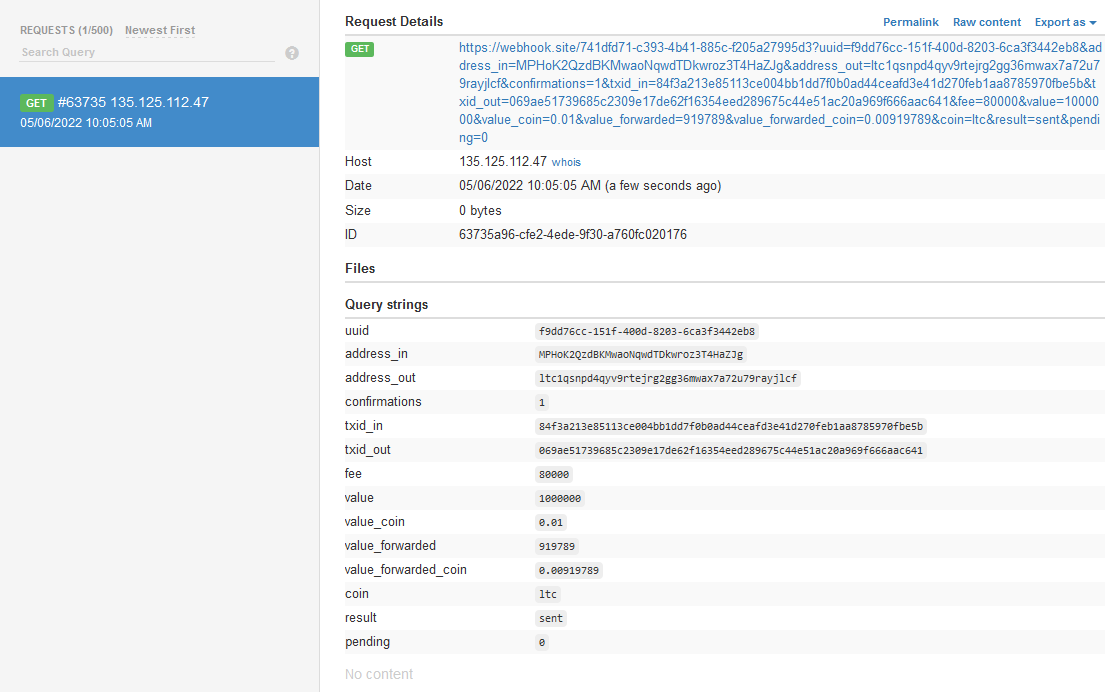
You can see exactly what CryptAPI sends to your callback URL with a free webhook inspector such as webhook.site, before writing any code.
Step 1: Get a unique webhook URL
Open the webhook website and copy your unique URL. Copy it from the Your unique URL field, not from the browser's address bar.

Step 2: Pick a cryptocurrency
Choose the coin or token you want to test with (see our cryptocurrencies list). In this example we use LTC, which is a good coin for testing.
Step 3: Request a payment address
Put the webhook URL and your crypto address (copied from your wallet) into a CryptAPI request like this:
https://api.cryptapi.io/ltc/create/?address=your_crypto_address&callback=webhook_urlIf everything is correct, you will get a response like this:
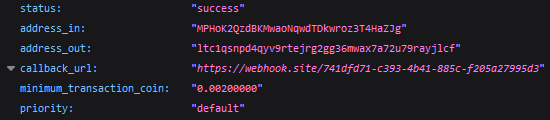
Step 4: Send a payment
Send a payment to the address in the address_in field of the response. Make sure it's above the minimum transaction value for that coin.
Step 5: Check the callback
If everything went well, your webhook page should look like this. It means CryptAPI received the payment and forwarded it to your crypto address.